File Checker
This tool checks generic CSV files for data types, mandatory columns, broken references, and more.
What the Tool Takes as Input
The tool takes two things as input:
- A
file template, specifying the rules:- Mandatory columns
- Data types
- Reference (Foreign Keys)
- Uniqueness (Primary Keys)
The templates are provided by Catalog.
- A set of
CSV files, to be checked
What the Tool Produces
After running, the tool produces two outputs:
- A
status, indicating if the files are valid or not - A summary of detected errors (empty when the files are valid)
- A detailed log of errors, when the
verbosemode is activated
If you push files without fixing issues, partial results will be loaded in Catalog.
This tool allows you to track issues, fix them, and re-run the checks. Once you're happy with the % of valid rows, you can push the files to Catalog.
Example
Here's an example of the output logs (without the verbose mode):
INFO - DATABASE -- 2 rows -- valid

INFO - SCHEMA -- 12 rows -- valid

INFO - TABLE -- 62 rows -- valid

INFO - COLUMN -- 616 rows -- ERROR (3 invalid rows)
| MISSING_VALUE: 1
| UNAUTHORIZED_VALUE: 2
| UNKNOWN_REFERENCE: 1

INFO - USER -- 4 rows -- valid

INFO - VIEW_DDL -- 2 rows -- valid

INFO - QUERY -- 153 rows -- valid
In that case, the files are almost valid, except for COLUMNS:
- 3 rows are not valid (4 issues were detected)
- If you push those files to Catalog, 613 columns will be loaded
List of Issues
The following errors can be detected:
MISSING_VALUE- some columns are mandatory and must be provided
- check the header: some columns might be missing or have a wrong name
- check the rows: some cells might be empty
WRONG_DATATYPE- dates, floats, integers
UNAUTHORIZED_VALUE- this column accepts only certain values
- example: 0
- detailed logs show the list of authorized values
DUPLICATE_VALUE- this column must be unique and a duplicate was detected
UNKNOWN_REFERENCE- the column references another column which has not been found
- check that the reference is not broken
- check that the referred row is valid itself (otherwise it will be considered as unknown)
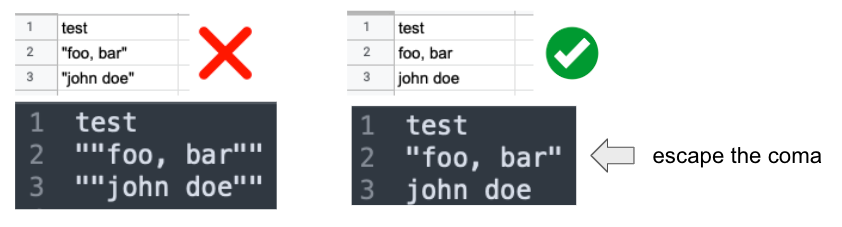
REPEATED_QUOTES- the value is surrounded by repeated quotes that will be interpreted as such
- the checker fails to avoid loading quoted text in Catalog, such as
"dim_client" - it's probably not intentional and it generally happens when using spreadsheet to generate the CSV (File > Export As > CSV)
Templates
Generic Warehouse
It allows you to push generic warehouse CSV files to Catalog:
- Databases
- Schemas
- Tables
- etc.
More info about this template in the warehouse importer documentation.
For now, this is the only template provided with the tool.
Usage
castor-file-check [arguments]
--directory: Path to the directory containing your CSV files--verbose: (optional) When provided, a log of each invalid row will be displayed
The given directory must contain all files mentioned in the warehouse importer template:
database.csvschema.csv- etc.
The files can be prefixed (with timestamps or anything else):
978193-database.CSV978193-schema.CSV
If several files are found, the most recently created will be used.