Documentation index: llms.txt. This page is also available as markdown: append .md to this URL or send Accept: text/markdown.
Warehouse Importer
Warehouses share common structures. We have defined a format so you can load your metadata into Catalog. Fill in the 7 files below and push them to our endpoint using the Catalog Uploader.
Catalog administrators generate API tokens in Settings > API. See Getting Your Catalog API Keys for creation steps and rotation guidance when a token expires or changes.
All 7 files are mandatory and data must make sense. If you add a column in the column file but the table that contains it is not in the table file, it will fail to load into Catalog.
Always prefix file names with a Unix timestamp.
CSV Formatting
If you build these files in Excel or Google Sheets, save as CSV (Comma delimited), not CSV UTF-8. UTF-8 exports can include a byte-order mark that complicates ingestion.
Here's an example of a very simple CSV file:
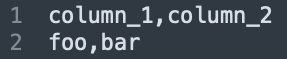
List Field Values
Some fields such as tags are typed as list[string]. In that case, several formats are accepted:
- list "['a', 'b']"
- tuples "('a', 'b')"
- sets "{'a', 'b', 'c'}"

Empty list allowed: []
Singleton allowed: 'a'
Multiple types allowed: "['foo', 100, 19.8]"
Fields containing commas must be quoted. See Quoting below.
Forbidden Characters
- Column separator is the comma
, - Row separator is the carriage return
Quoting
Most string fields such as table names and column names should not contain commas or carriage returns. Generally the problem comes with large text fields, such as SQL queries or descriptions.
If you have any doubts, you can quote all your text fields:

Files
🔑 Primary Key (must be unique)
🔐 Foreign Key (must reference an existing entry)
❓Optional (empty string in the CSV)
1. Database
database.csv
Database Fields
id string 🔑
database_name string
2. Schema
schema (3).csv
Schema Fields
id string 🔑
database_id string > database.id 🔐
schema_name string
description string ❓
tags list[string] ❓
3. Table
table (5).csv
Table Fields
id string 🔑
schema_id string > schema.id 🔐
table_name string
description string ❓
tags list[string] ❓
type enum {TABLE | VIEW | EXTERNAL | TOPIC}
owner_external_id string > user.id ❓
4. Column
column (1).csv
Column Fields
id string 🔑
table_id string > table.id 🔐
column_name string
description string ❓
data_type enum: { BOOLEAN | INTEGER | FLOAT | STRING | ... | CUSTOM }
ordinal_position positive integer ❓
5. Query
query (7).csv
Upload the Query file even when it has no rows. The file itself is required.
We only ingest queries that ran the day before metadata ingestion. Include only those queries in the file; others are ignored.
Query Fields
query_id string > query.id
database_id string > database.id 🔐
database_name string > database.name
schema_name string > schema.name
query_text string
user_id string > user.id 🔐
user_name string > user name
start_time timestamp
end_time timestamp ❓
6. View DDL
view_ddl (7).csv
Upload the View DDL file even when it has no rows. The file itself is required.
View DDL Fields
database_name string
schema_name string
view_name string
view_definition string
7. User
user.csv
Upload the User file even when it has no rows. The file itself is required.
User Fields
id string 🔑
email string ❓
first_name string ❓
last_name string ❓
Lineage
We compute lineage for your integration by analyzing and parsing the Queries and View DDL when possible.
Alternatively, you can complete the following lineage mapping for Tables and/or Columns and we will ingest them during each update.
1. Table Lineage
external_table_lineage.csv
Table Lineage Fields
parent_path string 🔑: path of the parent table
child_path string 🔑: path of the child table
2. Column Lineage
external_column_lineage.csv
Column Lineage Fields
parent_path string 🔑: path of the parent column
child_path string 🔑: path of the child column