Documentation index: llms.txt. This page is also available as markdown: append .md to this URL or send Accept: text/markdown.
Tag Settings
Edit the settings on this page to configure tag governance in Catalog. Tag governance includes two distinct permission settings: who can create new tags and who can apply existing tags to assets.
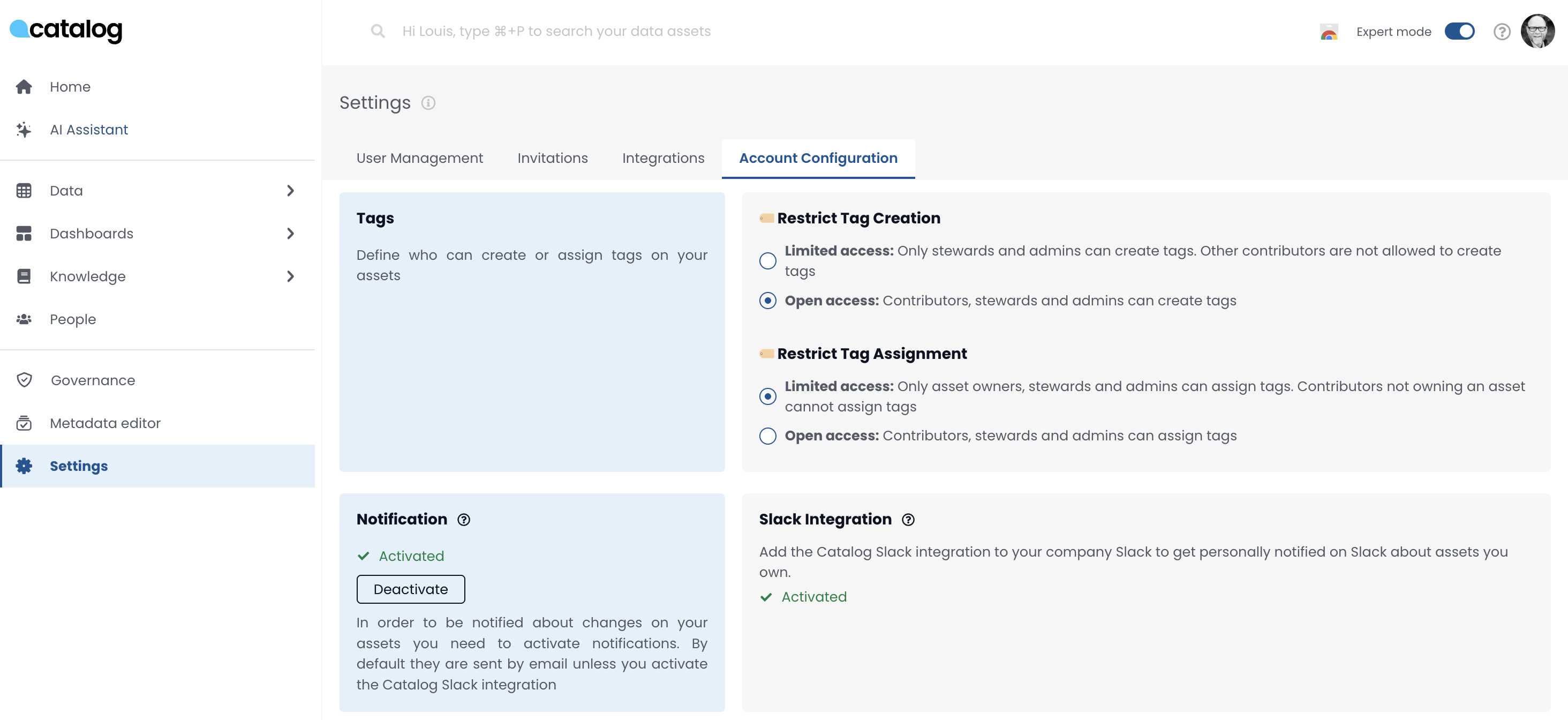
Tag Governance Settings
Tag governance in Catalog includes two distinct permission settings:
- Tag Creation: Controls who can create new tags.
- Tag Assignment: Controls who can apply existing tags to assets.
These settings help prevent:
- Uncontrolled tag sprawl
- Unauthorized tagging of assets
1. Tag Creation
Tag Creation Purpose
Controls who can create new tag objects (for example, "Sensitive", "PII", and so on).
Tag Creation Access Options
- Admins and Stewards only (recommended for stricter governance)
- Contributors, Stewards, and Admins (more open tagging environment)
How Tag Creation Works
When enabled:
- Users with appropriate permission can go to Governance > Tag Manager
- Create new tags by providing a name and selecting a color
Example:
- Navigate to Tag Manager
- Click Create New Tag
- Name it (for example,
Sensitive-Test) and choose a color - Save
Tag Creation Best Practice
Restrict tag creation to Admins and Stewards to avoid tag clutter and maintain a clean tag taxonomy.
2. Tag Assignment
Tag Assignment Purpose
Controls who can assign existing tags to assets (for example, tables, dashboards).
Tag Assignment Access Options
- Restricted: Only asset owners (must also be contributors) can assign tags
- Open: Any contributor can assign tags to any asset
How Tag Assignment Works
When enabled:
- Users can assign tags if they meet the configured permission
- Asset ownership is enforced only in the restricted mode
Tag Assignment Best Practice
Use the restricted setting if:
- You want to prevent contributors from tagging assets they do not own
- You need tighter control over who labels data with governance tags
Governance Strategy Recommendations
- Avoid Tag Sprawl: Restrict tag creation to Admins or Stewards.
- Maintain Tag Integrity: Restrict tag assignment if you are concerned about misuse or inconsistency.
- Balance Access and Engagement: Avoid over-restricting contributors. Only enable limitations if actual governance issues are occurring.
Contribution to data documentation and tagging is hard to incentivize. Only restrict permissions when there is a clear need.
Summary
| Setting | Purpose | Recommended For |
|---|---|---|
| Tag Creation | Who can create new tags | Limit to Admins or Stewards to avoid sprawl |
| Tag Assignment | Who can assign tags to assets | Restrict if asset integrity is at risk |
Use these controls to strike the right balance between collaboration and governance in your data environment.