Documentation index: llms.txt. This page is also available as markdown: append .md to this URL or send Accept: text/markdown.
AI-Powered Descriptions
The Catalog offers AI-powered documentation generation to help you quickly create high-quality descriptions for your tables, dashboards, and columns using available metadata and lineage context. With a few clicks, you can reduce the time and effort required to keep clear, consistent documentation across your data environment.
AI-Powered Descriptions for Columns
You can leverage AI to document your columns as well by clicking on this button .png) in the Description column on your table.
in the Description column on your table.
It will generate the documentation for the first thirty columns at a time. For each documented column you'll see "From AI Assistant" so you can easily identify them.
AI-Powered Descriptions for Tables and Dashboards
AI can also be leveraged to generate descriptions at the asset level.
Key Capabilities
- Metadata-aware generation - The AI uses table and dashboard metadata, along with upstream lineage, to generate accurate and relevant descriptions.
- Template-driven consistency - You can structure documentation with your description templates, which keeps tone aligned with internal standards.
- Multi-query insight - The assistant queries upstream dependencies to add context beyond a single metadata snapshot.
- Faster, more complete documentation - You can produce comprehensive documentation in seconds instead of lengthy manual passes.
How To Use It
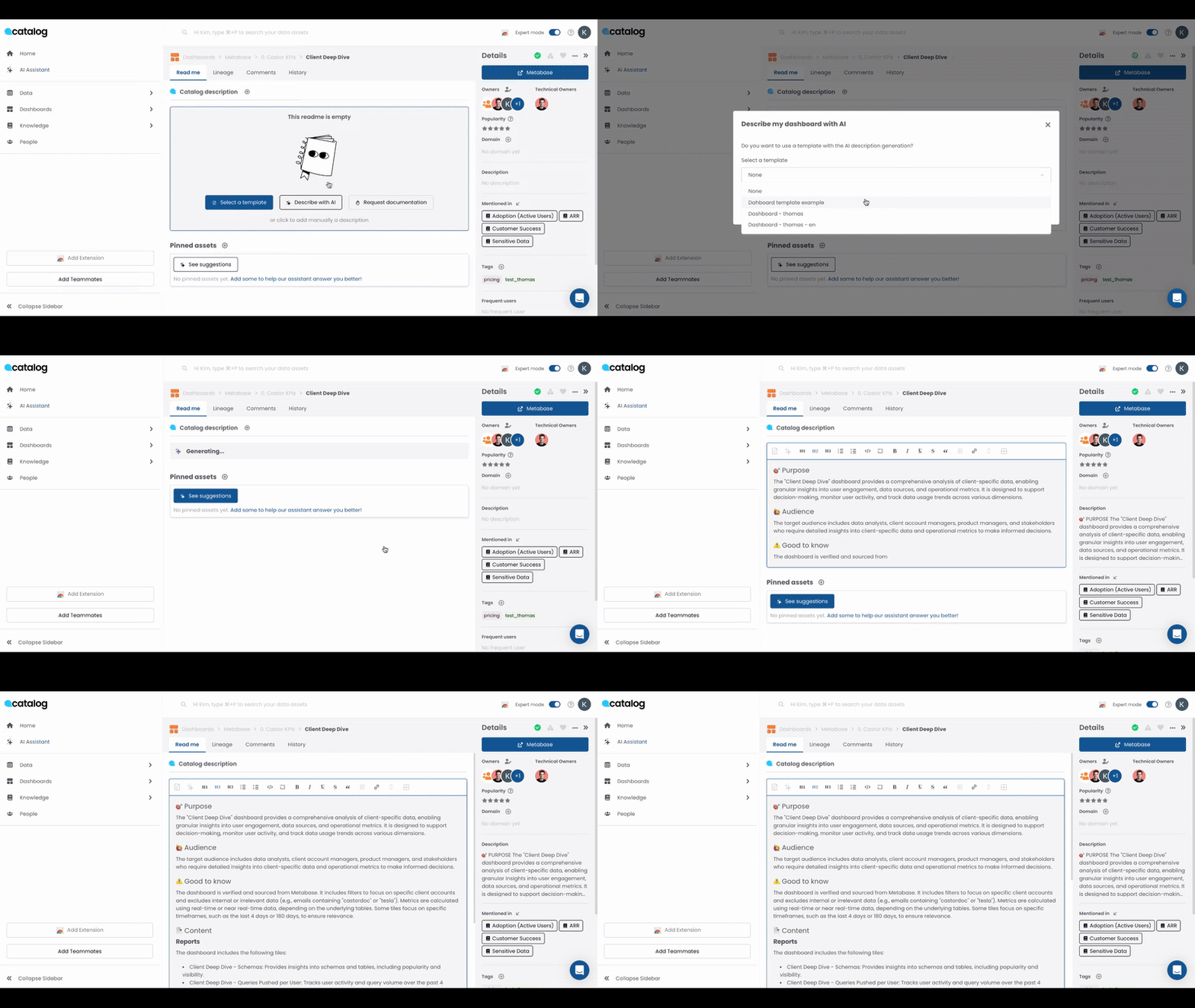
- Navigate to the documentation section of any Table or Dashboard in the Catalog.
- Click "Describe with AI".
- Select a template that matches your documentation standards.
- The AI analyzes the available metadata, applies the selected template, and auto-generates a description ready for review or immediate use.
Tip: You can always edit or enhance the generated content to better fit your specific use cases or internal standards.
Troubleshooting
These situations appear when AI workflows overlap with permissions, templates, or automation.
Public API Calls Return Errors When Writing Descriptions Programmatically
Workspace-level gates can block GraphQL mutations such as updateTableDescriptions even when read queries succeed with the same token.
Resolution:
- Confirm with your administrator whether programmatic documentation writes are enabled for your workspace. Review Catalog Public API for supported authentication flows.
- Request activation through Coalesce Support if automation requires description-write scopes your token cannot unlock yet.
- Retry mutations after activation propagates (typically minutes, not hours).
Column Batches Stop After Thirty Columns
The in-product generator processes columns in chunks so browsers stay responsive.
Resolution:
- Run the AI describe action again on the remaining columns.
- Prioritize high-impact columns first when tables are very wide.
Generated Text Does Not Match Internal Vocabulary
Templates steer tone, but AI still blends terminology from lineage and metadata snapshots.
Resolution:
- Choose the template closest to your internal style guide under Describe with AI.
- Edit generated paragraphs manually and save; Catalog stores curator edits as the source of truth.
AI Cannot Infer Lineage Context for an Asset
Upstream lineage must exist in Catalog before the assistant can reference it.
Resolution:
- Finish warehouse and BI ingestion jobs so lineage graphs populate.
- Link related tables manually through knowledge pages when integrations lag behind governance deadlines.
Duplicate Descriptions After Rerunning Automation
Repeated runs without reviewing drafts can stack similar paragraphs.
Resolution:
- Delete outdated AI paragraphs before regenerating content.
- Coordinate schedules so API jobs and UI actions do not race on the same asset during testing.