Documentation index: llms.txt. This page is also available as markdown: append .md to this URL or send Accept: text/markdown.
Column Description Propagation
It's common for a column to be reused "as is" by downstream tables. In that case, the column will be called in the "Select" SQL clause, without any modification.
In that case, why should you document the downstream columns? You're right, you should not have to. Catalog solves that for you.
In the image below, user.account_id inherits its description from its parent column in the opportunity table.
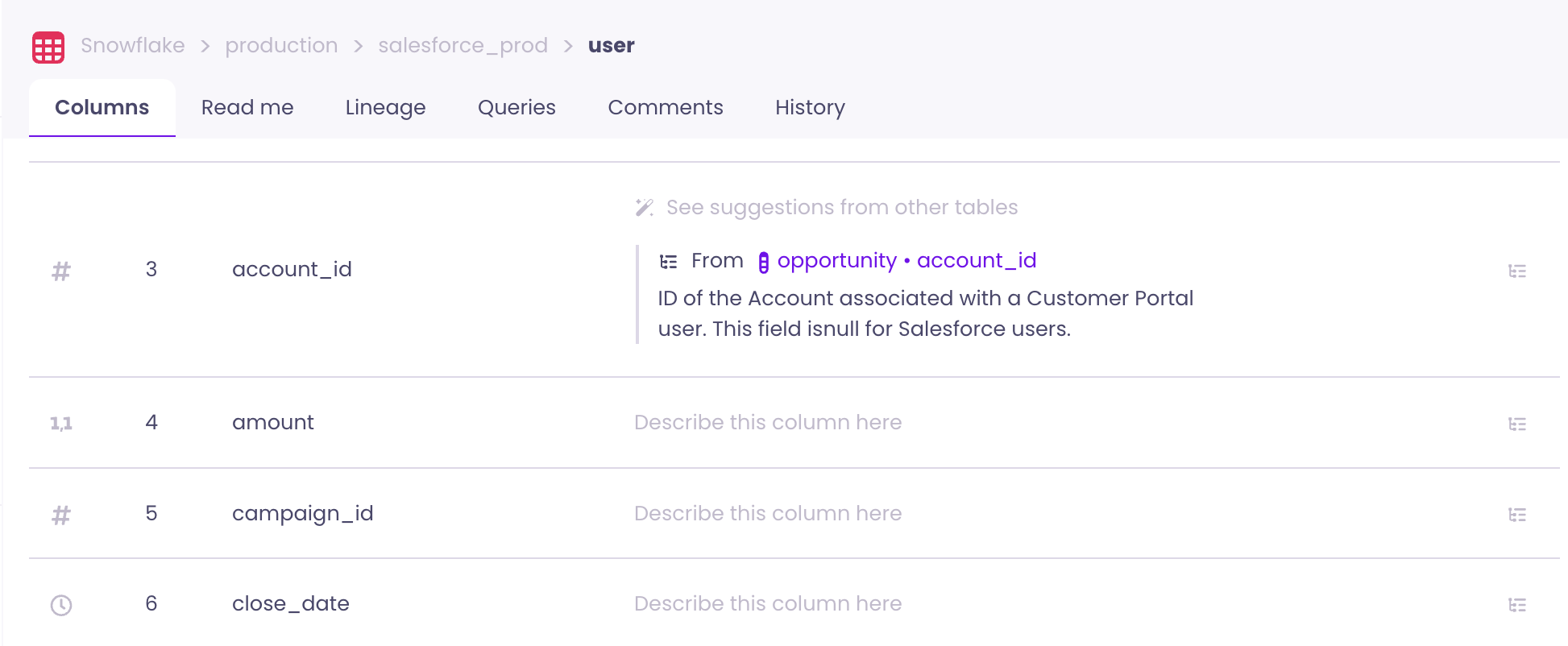
Requirements
There are just 3 simple requirements for this feature to be activated:
- Parent and child column need to have the same exact name
- Child column is generated directly from parent without any SQL transformations
- Child column has one and only one parent
Dashboard fields are out of scope for this feature. Descriptions cannot propagate from table columns to dashboard fields.
Troubleshooting
Use this table to diagnose why descriptions might not propagate.
| Symptom | Likely cause | Action |
|---|---|---|
| Propagation not working | One or more requirements not met | Verify: (1) parent and child column have the exact same name, (2) child column has no SQL transforms, (3) child column has exactly one parent. |
| No lineage visible | Lineage not computed or not available | See Lineage Troubleshooting for common causes. |
| Descriptions don't propagate to dashboard fields | Feature limitation | Dashboard fields are not supported. Use the Metadata Editor to add descriptions manually. |
When Propagation Doesn't Apply
Propagation does not apply when:
- Columns have transforms—The child column is derived with SQL (for example,
CAST,CONCAT, or expressions). - Multiple parents—The child column is built from more than one upstream column.
- Different names—Parent and child column names differ.
In these cases, use the Metadata Editor with the Ancestors filter to select downstream tables and bulk-apply descriptions.