Documentation index: llms.txt. This page is also available as markdown: append .md to this URL or send Accept: text/markdown.
Coalesce Owners
Catalog can show Technical Owners on tables built with Coalesce Transform. These owners reflect who has contributed to the underlying node definitions in your linked Git repository. They are synced into Catalog and are not the same as Owners you assign manually in the asset page.
.png)
Requirements
Owner Auto Detection needs both a Coalesce Transform API connection and read access to the Git repositories that store your Coalesce project. See the feature matrix on the Coalesce integration overview.
You need Catalog admin access to request GitHub analysis.
Enable the integration:
Set Up
Grant the Catalog technical GitHub user techcastor contributor access to each relevant Coalesce repository, as described in Grant Access to Your Git Repositories on the overview page.
How Top Editors Are Determined
Catalog identifies top editors by analyzing Git history for files that correspond to your Coalesce nodes.
- Catalog reads contribution data from the current state of your repository (
HEAD) using Git blame on the relevant node files. - For each file, Catalog counts how many lines each author last touched.
- Authors are ranked by total line count for that node.
- Catalog keeps up to three contributors per table who meet these rules:
- They have at least five lines attributed to them on that node.
- Their commit email maps to your organization’s domain (internal contributors). Personal or unrecognized emails are excluded.
The people who qualify are shown as Technical Owners on the matching warehouse table in Catalog. This reflects recent edit activity in Git, not job titles or ownership fields inside Coalesce Transform.
Technical Owners are imported from the integration and cannot be edited on the asset page. Owners are people or teams you assign in Catalog for governance. See Ownership for how both roles work together.
When Owner Lists Update
Technical Owners for Coalesce aren't refreshed on every Coalesce metadata sync.
| What runs | How often | What it updates |
|---|---|---|
| Coalesce Transform ingest | Daily | Node mapping, descriptions, lineage markers, and related metadata |
| Git contribution analysis for owners | On request | Technical Owners from repository contributions |
The daily Coalesce ingest job syncs nodes and descriptions from the Coalesce API. It doesn't recompute Technical Owners from Git on that schedule.
To refresh Technical Owners from Git, follow Request GitHub Analysis. Updated owners appear in Catalog after that run completes. There is no real-time update when someone pushes to Git.
If you need owners to change after large repository changes, request another analysis once those changes are merged.
Request GitHub Analysis
Use these steps when you need to refresh Technical Owners from Git after merges or ownership changes.
- Sign in to Catalog.
- Go to Settings > Integrations and open your Coalesce Transform source.
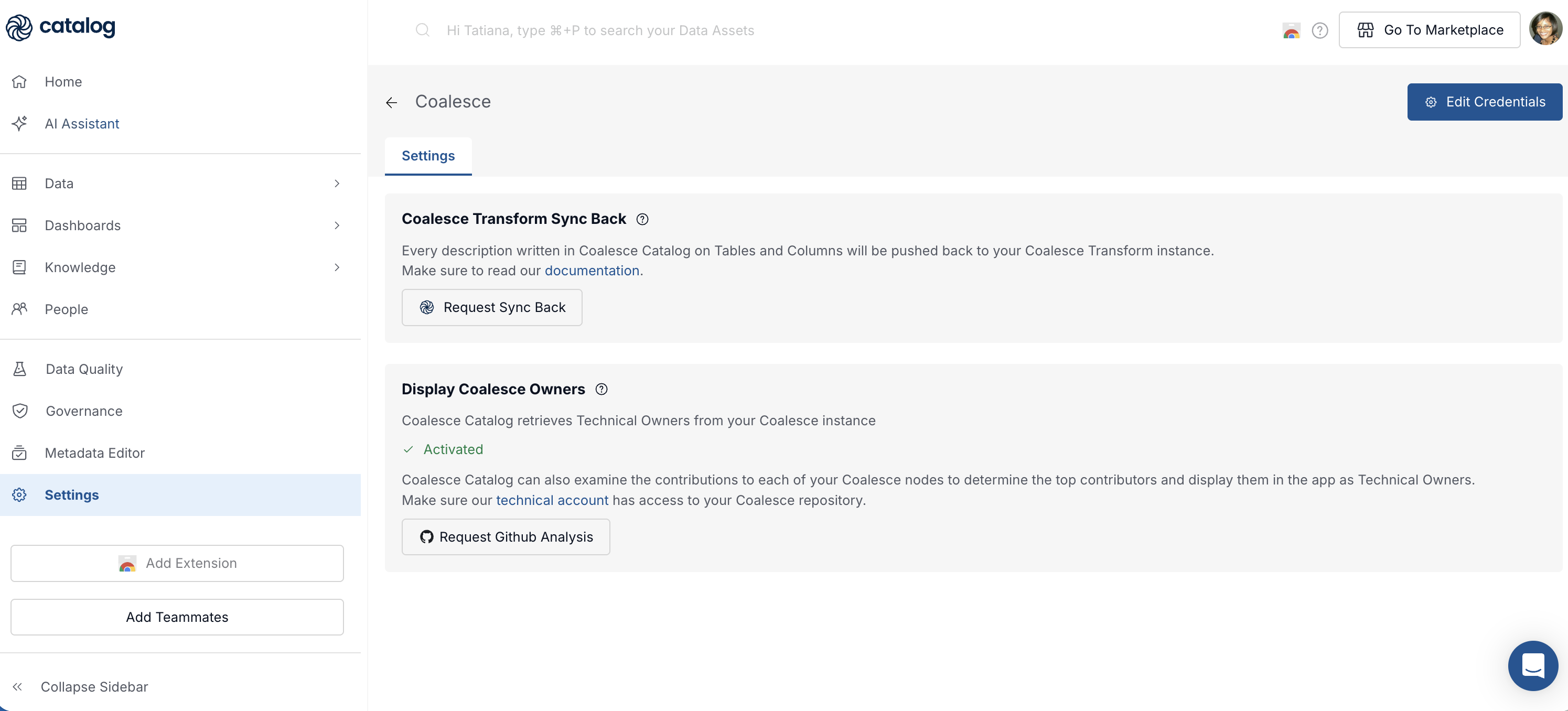
- In Display Coalesce Owners, confirm the feature shows as activated and that
techcastorhas access to the repository. - Select Request GitHub Analysis.
Catalog notifies the operations team to run the analysis. Allow time for processing before you check tables in Catalog.
Troubleshooting
If Technical Owners are missing, outdated, or not who you expect, work through these checks.
Technical Owners Look Wrong or Outdated
- Confirm the table is tied to a Coalesce node and that the Git repository Catalog analyzes matches the project you expect.
- Check that recent commits use email addresses on your company domain. Contributors with fewer than five attributed lines or external emails are filtered out.
- Request a new GitHub analysis after merges or ownership changes in Git.
No Technical Owners on a Coalesce-Built Table
- Verify API credentials and Git access on the Coalesce integration overview.
- Confirm Owner Auto Detection prerequisites are met.
- Run Request GitHub Analysis if owners have never been computed for this source.
You Expected a Different Person
Technical Owners favor the top three Git contributors by line count on the node file. Someone who owns the pipeline in Coalesce but rarely edits the repository may not appear. Assign Owners in Catalog when you need an explicit governance contact.