Documentation index: llms.txt. This page is also available as markdown: append .md to this URL or send Accept: text/markdown.
Browser Extensions
Get Catalog metadata directly from your BI tools and SQL editors with the Catalog browser extension.
Install from the Chrome Web Store.
Supported Browsers
- Chrome
- Edge
What You Can Do With It
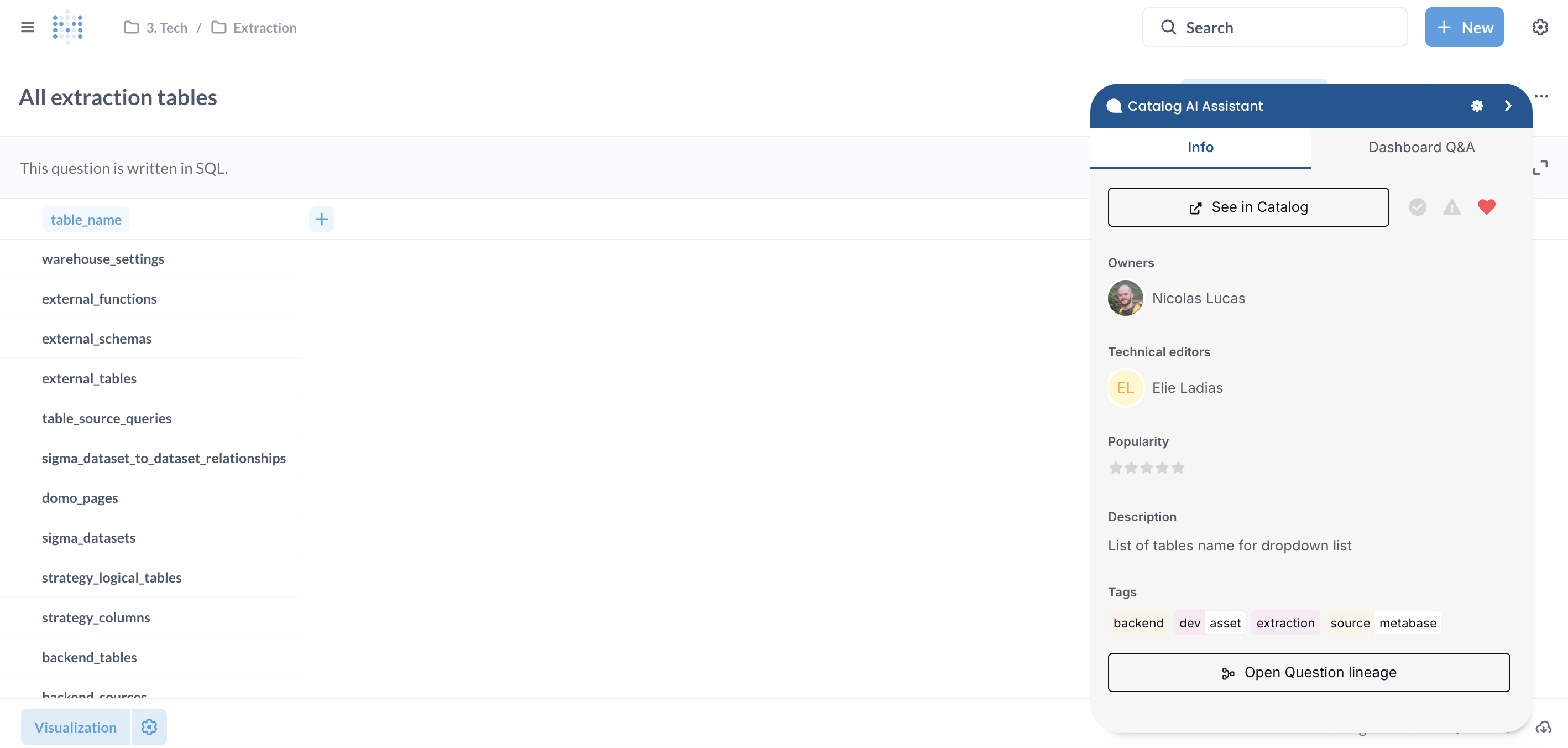
From your BI tools and SQL editors, get access to relevant metadata with the Catalog Chrome extension.
You will see descriptions, owners, and popularity. You can also interact with owners and ask questions about a given dashboard or table.
How to Install the Extension
Install from Catalog on Chrome Web Store (works for Edge as well).
For users on Edge, allow extensions from other stores. See Add, turn off, or remove extensions in Microsoft Edge.
Technologies Covered
We add new technologies every month. The extension currently covers:
- Domo
- Looker
- Looker Studio
- Metabase
- Power BI
- Sigma
- Strategy
- Tableau
- Qlik
Troubleshooting
These fixes cover installation problems and missing Catalog panels inside supported BI tools.
Extension options show the wrong Catalog region or zone
The widget reads region preferences from extension settings. When the settings screen omits your preferred zone, sign-in attempts may hit the wrong Catalog hostname and return authentication errors.
Resolution:
- Remove the extension, restart the browser, and reinstall from Catalog on Chrome Web Store so Chrome reloads default permissions.
- Sign in through the Catalog web app first with the correct workspace URL, then reopen the embedded widget inside your BI tool.
- If region toggles still never appear, capture a screenshot of the extension options screen and contact Coalesce Support.
Sign-in fails after selecting the widget gear icon
Cached credentials or conflicting Chrome profiles block OAuth flows between Domo, Tableau, or other embedded hosts.
Resolution:
- Clear site data for both Catalog and your BI vendor domain, then retry once.
- Disable conflicting extensions temporarily to rule out script blockers.
Edge cannot install the package
Edge requires permission to install Chrome Web Store extensions.
Resolution:
- Follow Microsoft guidance linked in Edge Users above to allow extensions from other stores.
- Install using the same Chrome Web Store listing as Chrome users.
Toolbar panels stay empty even though Catalog has metadata
Catalog must finish indexing assets before the extension can pull descriptions.
Resolution:
- Confirm the underlying integration (warehouse or BI source) completed ingestion in Settings > Integrations.
- Validate that you browse the same Catalog hostname your administrator configured for SSO.
Technology listed under Technologies Covered still shows no overlay
Some hosts load dashboards inside iframes where third-party extensions cannot inject scripts.
Resolution:
- Open the asset in a top-level browser tab when supported by your BI vendor.
- Ask Coalesce Support whether your exact embedding pattern is on the roadmap.