Documentation index: llms.txt. This page is also available as markdown: append .md to this URL or send Accept: text/markdown.
Sync Back to Looker (Beta)
Push descriptions from the Catalog back to your Looker dashboards.
If your Catalog workspace includes a combined Coalesce, Looker, and Transform setup, this page covers Sync back to Looker only (dashboard descriptions in Looker). To push table and column descriptions to Coalesce Transform, see Sync Back to Coalesce.
Before You Start
Complete these prerequisites before you click Sync back to Looker. That way your integration, ingestion, and Catalog descriptions are ready when you request a sync.
- A warehouse integration is configured in Catalog (required before the first Looker ingestion).
- A Catalog-managed Looker integration is configured with Looker admin credentials and an admin API key.
- Catalog has read-only access to your LookML Git repository (needed for Looker ingestion and lineage).
- The first Looker ingestion has finished (this can take up to 48 hours; Catalog notifies you when it completes).
- You have written dashboard descriptions in Catalog for the dashboards you want in Looker.
- You understand that sync back pushes dashboard descriptions only and that Catalog does not overwrite existing Looker descriptions (see What Happens If a Description Already Exists in Looker? below).
You do not need to grant additional Looker or Git access beyond what you already configured for the Looker integration. See Do You Need To Provide Additional Access? below.
What Can You Sync Back to Looker?
The Looker sync back feature pushes a description to your dashboards in Looker. Catalog does not sync other dashboard fields through this flow.
How to Sync Back to Looker
To request a sync:
-
Write dashboard descriptions in Catalog for the dashboards you want in Looker.
-
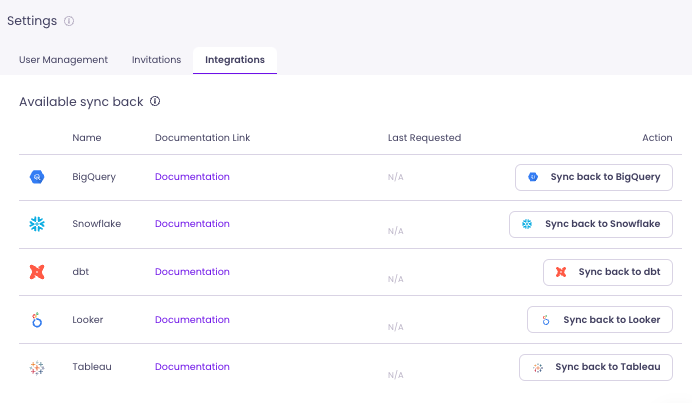
Go to Settings and open the Integration tab.
-
Click Sync back to Looker.
-
Once Catalog notifies you that the sync back succeeded, your descriptions appear in Looker.
Looker descriptions are limited to 255 characters.
What Happens If a Description Already Exists in Looker?
Catalog does not overwrite existing descriptions on Looker dashboards. If a dashboard already has a description, Catalog leaves it unchanged.
You can still write and store a different description in Catalog. Once you delete the existing description in Looker, sync back can push the description you wrote in Catalog to Looker.
Do You Need To Provide Additional Access?
No. The permission level of your existing Looker integration stays the same. No extra access is required for sync back beyond what you configured for the Looker integration.