Documentation index: llms.txt. This page is also available as markdown: append .md to this URL or send Accept: text/markdown.
Managing Time Zones, Business Holidays, and Daylight Saving in Coalesce Scheduling
Learn how to handle different timezones, daylight savings, and holidays when scheduling Jobs in Coalesce.
Manually Adjust
If you're using the Coalesce Scheduler, you can manually change the schedule. For example, Change 0 11 * * * (6 AM EST) to 0 10 * * * (6 AM EDT).
Using Date Dimension Node
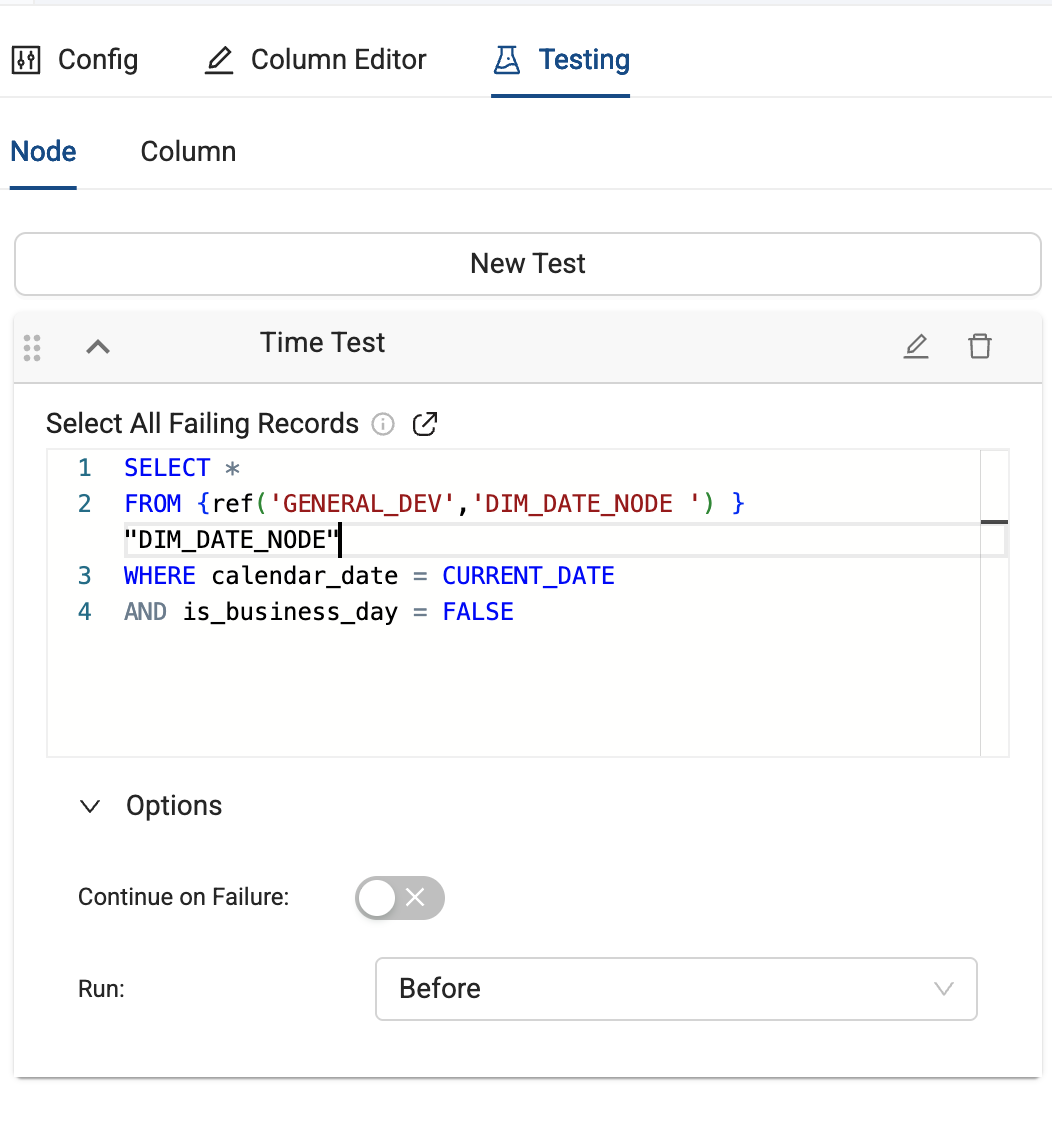
Using a Date Dimension Node from our Functional Node Types package, create a Node level test on the first Nodes in your pipeline. It will check for certain conditions and if it's not a business day or the right time, then the test will fail and the pipeline won't run.
Make sure Continue on Failure is turned off so it fails and Run Before.
-- Example test to check if current date is a business day
SELECT *
FROM {ref('GENERAL_DEV','DIM_DATE_NODE ') } "DIM_DATE_NODE"
WHERE calendar_date = CURRENT_DATE
AND is_business_day = FALSE
Using a Third Party Tool
If you manage your scheduling using a tool like Airflow or GitHub actions, you can add a script to check the date and time.
These are just examples and should be adjusted for your use.
GitHub Actions
- Always schedule jobs in UTC in the GitHub Actions workflow.
- In your Python script:
- Use
pytzorzoneinfoto convert UTC to local time. There are multiple Python libraries available. - Check if today is a business day using a holiday calendar.
- Run Coalesce CLI only if conditions are met.
- Use
- GitHub Actions
- coalesce_ci.py
name: Deploy to Environment

on:
 push:
   branches:
     - main
 workflow_dispatch:

env:
 COA_VERSION: latest # Pin a specific version in production
 TZ_REGION: "America/New_York" # Local business timezone

jobs:
 deploy:
   runs-on: ubuntu-latest

   steps:
     - uses: actions/checkout@v3
     - uses: actions/setup-node@v3
       with:
         node-version: 22.19.0

     # Fetch config secret from GitHub Actions secret repository
     - run: echo '${{ secrets.COA_CONFIG }}' >> COA_CONFIG

     # Install Coalesce CLI if not already present
     - run: npm list | grep "@coalescesoftware/coa@${{ env.COA_VERSION }}" || npm install @coalescesoftware/coa@${{ env.COA_VERSION }}

     # Print version number
     - run: npx coa --version

     # Install Python for holiday/DST checks
     - uses: actions/setup-python@v4
       with:
         python-version: "3.11"
     - run: pip install holidays pytz

     # Run Python script: checks holidays/DST + runs coa commands
     - name: Run Coalesce Deployment with Business-Day Check
       run: python .github/workflows/coalesce_ci.py
       env:
         COA_CONFIG: ${{ secrets.COA_CONFIG }}
         TZ_REGION: ${{ env.TZ_REGION }}
import os, sys, subprocess
from datetime import datetime
import holidays
import pytz

def is_business_day():
    tz_region = os.getenv("TZ_REGION", "UTC")
    tz = pytz.timezone(tz_region)
    today = datetime.now(tz).date()

    us_holidays = holidays.US()
    if today.weekday() >= 5 or today in us_holidays:
        print(f"Skipping run: {today} is weekend/holiday")
        return False
    return True

def run_coalesce():
    coa_config = os.getenv("COA_CONFIG")
    if not coa_config:
        sys.exit("Missing COA_CONFIG environment variable.")

    # Write config to temp file
    with open("coa_config.yaml", "w") as f:
        f.write(coa_config)

    # Plan + Deploy
    subprocess.check_call("npx coa plan --config coa_config.yaml --out ./coa-plan --debug", shell=True)
    subprocess.check_call("npx coa deploy --config coa_config.yaml --plan ./coa-plan --debug", shell=True)

if __name__ == "__main__":
    if is_business_day():
        run_coalesce()
    else:
        sys.exit(0)
Airflow
Here is an example that:
- Always runs at the same local business time regardless of DST.
- Checks that today is both a weekday and not a holiday.
- Only runs Coalesce jobs if conditions are satisfied.
from datetime import datetime, timedelta
import pendulum
import holidays
import requests
from airflow import DAG
from airflow.models import Variable
from airflow.operators.python_operator import PythonOperator

# Local timezone ensures DST consistency
local_tz = pendulum.timezone("America/New_York")
us_holidays = holidays.US()

default_args = {
    'owner': 'airflow',
    'start_date': datetime(2023, 1, 1, tzinfo=local_tz),
    'retries': 1,
    'retry_delay': timedelta(minutes=2),
}

dag = DAG(
    'coalesce_trigger_with_businessday_check',
    default_args=default_args,
    description='Trigger Coalesce only on business days at consistent local time',
    schedule_interval="0 6 * * *",  # 6 AM local time
    catchup=False,
)

def check_business_day(**context):
    today = datetime.now(local_tz).date()
    if today.weekday() >= 5 or today in us_holidays:
        raise ValueError(f"Skipping run: {today} is weekend or holiday")

def trigger_coalesce(**context):
    token = Variable.get('AIRFLOW_VAR_COALESCE_TOKEN')
    sf_key = str(Variable.get('AIRFLOW_VAR_SNOWFLAKE_PRIVATE_KEY'))

    url = "https://app.coalescesoftware.io/scheduler/startRun"
    payload = {
        "runDetails": {
            "parallelism": 16,
            "environmentID": "3",  # replace with your environment ID
            "jobID": "3"           # replace with your job ID
        },
        "userCredentials": {
            "snowflakeAuthType": "KeyPair",
            "snowflakeKeyPairKey": sf_key
        }
    }
    headers = {
        "accept": "application/json",
        "content-type": "application/json",
        "Authorization": f"Bearer {token}"
    }
    resp = requests.post(url, headers=headers, json=payload)
    resp.raise_for_status()

    run_counter = resp.json().get('runCounter')
    if not run_counter:
        raise ValueError("Missing runCounter in response")

    # Push runCounter to XCom for status check
    context['ti'].xcom_push(key='run_counter', value=run_counter)

def check_status(**context):
    token = Variable.get('AIRFLOW_VAR_COALESCE_TOKEN')
    run_counter = context['ti'].xcom_pull(key='run_counter', task_ids='trigger_job')

    url = f"https://app.coalescesoftware.io/scheduler/runStatus?runCounter={run_counter}"
    headers = {"Authorization": f"Bearer {token}", "accept": "application/json"}
    resp = requests.get(url, headers=headers)
    resp.raise_for_status()

    status = resp.json().get('status')
    if status != 'Success':
        raise Exception(f"Coalesce job failed with status: {status}")

# Define tasks
task_check_day = PythonOperator(
    task_id='check_business_day',
    python_callable=check_business_day,
    provide_context=True,
    dag=dag,
)

task_trigger = PythonOperator(
    task_id='trigger_job',
    python_callable=trigger_coalesce,
    provide_context=True,
    dag=dag,
)

task_status = PythonOperator(
    task_id='check_status',
    python_callable=check_status,
    provide_context=True,
    dag=dag,
)

# Set task dependencies
task_check_day >> task_trigger >> task_status