Documentation index: llms.txt. This page is also available as markdown: append .md to this URL or send Accept: text/markdown.
Install Apps From the App Marketplace
The App Marketplace lists the Coalesce Apps that Coalesce publishes. Install one, and Coalesce adds the app to your workspace's apps folder and to the Apps menu on the builder rail.
The App Marketplace is rolling out and may not be on for your organization yet. If Build Settings doesn't list Apps, contact your Coalesce account team, or install an app by hand.
Before You Begin
- Open a local workspace in Coalesce Desktop 7.51 or later, or in
coa servefromcoa7.51 or later. - Make sure your computer can reach
github.com,api.github.com, andcodeload.github.com. Coalesce downloads every app from GitHub.
View an App's Source
The source of every app in the App Marketplace is public on GitHub. To read an app's code, or to use it as the starting point for your own app, open the repository link on the app's card, or browse the Coalesce GitHub organization. To run a fork, see Build a Coalesce App.
Browse Apps
- Open Build Settings.
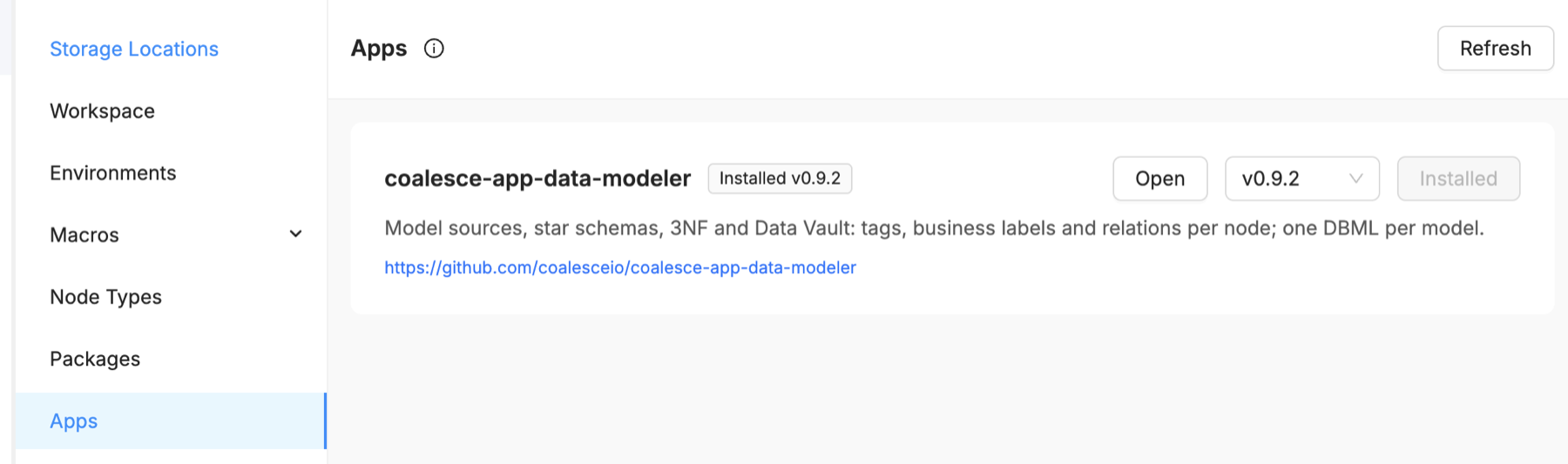
- Select Apps. It's listed after Packages.
Each app has a card that shows:
- The app's ID, which is also the name of its GitHub repository and of its folder in
apps/. - The app's description.
- A link to its source repository on GitHub.
- Installed v<version> when the app is in your workspace.
- Update available when a newer version is published.
Install an App
- On the app's card, pick a version. The newest version is selected by default.
- Select Install.
Coalesce downloads that version's source from GitHub and writes it to apps/<app-id>/ in your workspace. A notification confirms the install, for example Installed coalesce-app-data-modeler v0.9.2.
To open the app, select Open on its card, or select Apps on the builder rail and choose the app. The menu shows the app's display name, which can differ from its ID. The app opens as a tab in the canvas. The first time you open it, it can take a few seconds to start.
Update or Roll Back an App
- On the app's card, pick the version you want. The button changes to match:
- Update for a newer version.
- Roll back for an older version.
- Installed for the version you already have.
- Select Update or Roll back.
A notification confirms the change, for example Changed coalesce-app-data-modeler from v0.9.1 to v0.9.2. Coalesce stops the app, replaces its folder with the version you picked, and restarts any open tab of the app on the new version.
Installing another version replaces the whole apps/<app-id>/ folder, including any changes you made inside it. To customize an app, copy it to a folder with a new name and edit the copy. See Build a Coalesce App.
If an install fails partway, Coalesce restores the version you had.
Install an App by Hand
Use this when the App Marketplace isn't on for your organization.
- Open the app's repository in the Coalesce GitHub organization and download its source at a version tag, such as
v0.9.2. - Copy the app's files into
apps/<app-id>/in your workspace, where<app-id>is the repository name. - Add
"repository": "https://github.com/coalesceio/<app-id>"to the app'spackage.json, so the App Marketplace can manage the app later. - Reload Coalesce. The app appears in the Apps menu on the builder rail.
Share the Change With Your Team
Installing, updating, or rolling back an app changes files in your workspace. Commit the apps/<app-id>/ folder so your team gets the same version. The installed package.json records the version and the source repository.
Remove an App
The App Marketplace doesn't uninstall apps. To remove one, delete its apps/<app-id>/ folder, reload Coalesce, and commit the deletion.
Troubleshooting
| Message or symptom | What to do |
|---|---|
| Couldn't load the app marketplace | Coalesce couldn't reach GitHub. Check your network, and set HTTPS_PROXY if you're behind a proxy. Then select Retry. |
| The message mentions a rate limit | Wait a minute, then select Retry. Everyone behind one network address shares GitHub's limit. |
| Could not verify the TLS certificate | Set NODE_EXTRA_CA_CERTS to your organization's CA certificate, then restart Coalesce. |
| Couldn't reach GitHub to download an app | Check your network and HTTPS_PROXY, then try the install again. |
| Could not move the current app aside | Close anything that's using the app's files, then try again. |
| Couldn't install an app: apps/<app-id> already exists | A folder with the same name exists in apps/ and wasn't installed from the App Marketplace. Rename or delete that folder, then install. |
| Couldn't install an app because folders share the host name | Each app gets an address based on its folder name. Rename the other folder so its name doesn't match the app you're installing, ignoring case and punctuation. |
| An app version is no longer published | The list of apps refreshes. Pick another version. |
| An app version can't be installed | The release is missing files the app needs. Pick another version. |
| App <app-id> failed to start | If the server exited early, the tab shows its error output. Check the log for lines that start with [App:<app-id>]: the Desktop log file in Coalesce Desktop, or the coa serve output. |
| An app a teammate added doesn't appear in the Apps menu | Reload Coalesce after you pull. |